Free, open source, and 100% local
A real editor for the .vcf files your phone exports
Easy vCard Manager is an offline-first contact library. Import, edit, search and export vCard files right in your browser — no account, no upload, no server to send your contacts to.
- No upload
- No account
- Works offline
- MIT licensed
Your contacts never leave your device
This is not a promise we ask you to trust. There is simply no backend to send anything to.
- Nothing is uploaded
- The app has no backend. Parsing, editing and exporting all happen in your browser.
- Nothing is stored elsewhere
- Your library lives in your browser's IndexedDB, on your device, under your control.
- Nothing you have to take on trust
- The source is MIT-licensed and public. Open DevTools while you work and watch the network stay silent.
Features
Everything the online converters never gave you
A library, a full editor over the vCard spec, and every export format you need — with no ads, no limits and no sign-up.
- 100% local
- No account
- vCard 2.1 / 3.0 / 4.0
- QR + image export
Keep your contacts together
A local library for searching, sorting and autosaving one contact or a whole collection.
- Search across the details that matter
- Import and export multi-contact files
Edit without the guesswork
A clear, structured form makes it easy to fix the contact details hidden inside a .vcf file.
- Add phones, emails, addresses and more
- Start from a blank card or an import
See what you are sharing
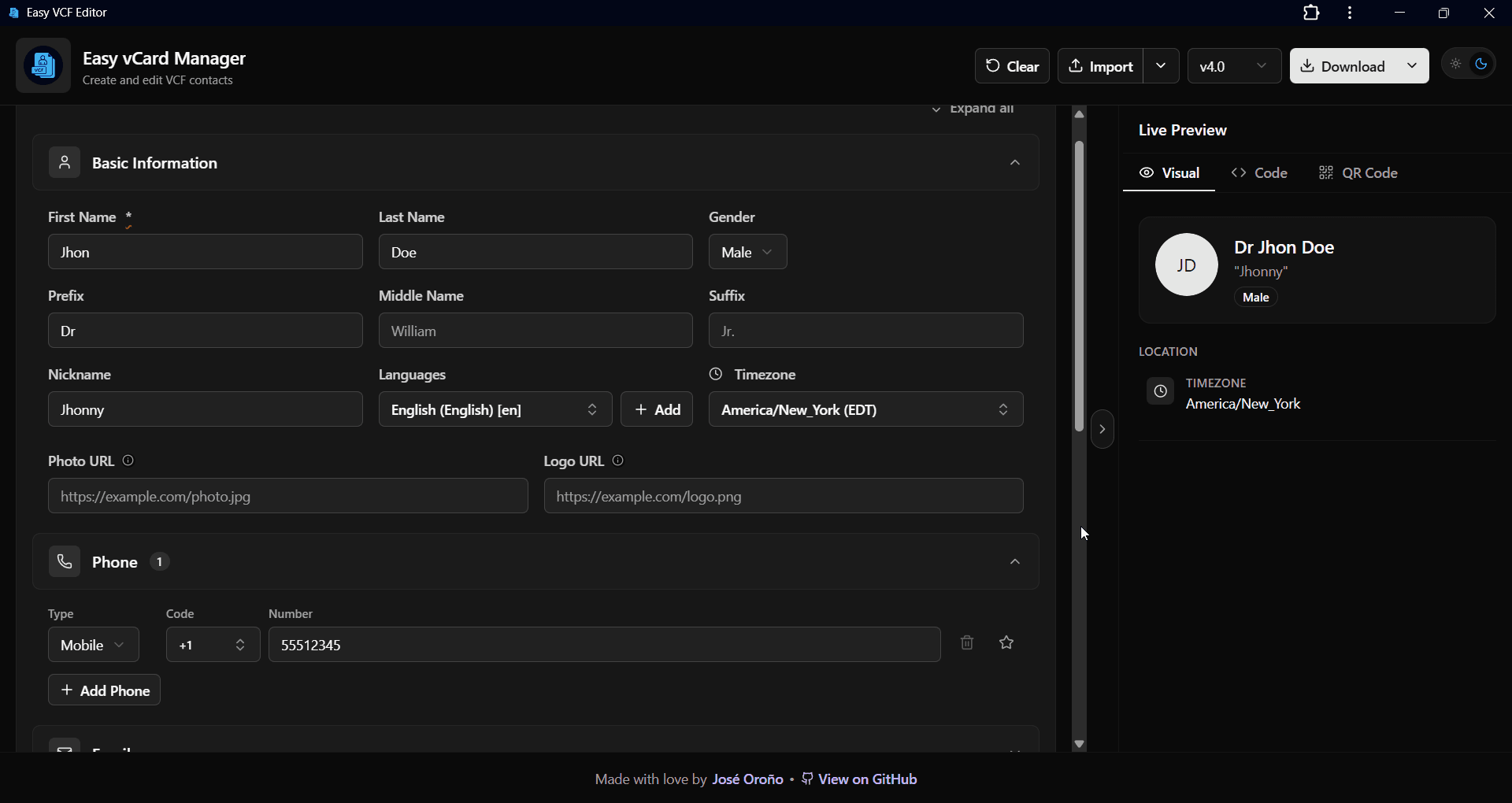
A live card preview, raw VCF view and QR code update as you work.
- Copy the exact VCF output
- Check a QR code before sharing
Bring contacts in
Drop in a .vcf file or paste vCard text from an email, phone or address book export.
- Works with single and multi-contact files
- Clear import feedback
Take them anywhere
Export a compatible .vcf, a scan-ready QR code or a contact-card image.
- Choose vCard 2.1, 3.0 or 4.0
- Share as a QR code or as a Business Card.
Works offline
Use it in a browser, install it as a PWA or use the Windows desktop build.
- No account or cloud upload
- Fits phones, tablets and desktops
How it works
Three steps, no sign-up in the way
Open the app and you are already working. There is nothing to configure and nothing to wait for.
Step 01
Bring a card in — or start blank
Drop a .vcf file on the window, choose one from the import dialog, or paste raw vCard text. Multi-contact files land as multiple contacts in your library.
Step 02
Edit it properly
Work through the structured form, add repeatable phones, emails and addresses, and watch the visual card and the raw VCF update as you type. Changes autosave locally.
Step 03
Export it the way you need it
Download .vcf in vCard 2.1, 3.0 or 4.0, grab a QR code as PNG or SVG, save a contact-card image, or copy the raw VCF to your clipboard.
Keep the details. Choose the destination.
Export the contact in the format that fits the next device, address book or person.
.vcf file
vCard 2.1, 3.0 or 4.0
QR code
PNG or SVG
Contact card image
For sharing and signatures
Raw VCF
Copy the exact text


Pick a vCard version
The same contact can be exported more than once, so you are never locked to one target.
- 2.1
- For legacy address books and older phones that reject newer cards.
- 3.0
- RecommendedThe safest pick, with the widest support across phones, CRMs and mail clients.
- 4.0
- The modern RFC 6350 spec, with the richest property set.
The editor reads and writes every one of these fields
Install anywhere
Runs in the browser. Installs like an app.
One codebase, three ways to use it — web app, installable PWA, and a desktop build. All of them fully offline.
Install as a mobile app
Add it to your home screen from the browser. The interface adapts to your screen, whether you are using a phone, tablet or desktop.
Install on your desktop
The same app installs as a PWA on desktop, and a Windows desktop build is available if you prefer a standalone window.
Keep working without a network
A service worker caches the app, so an offline reload still opens your library. Nothing breaks on a plane or an air-gapped machine.

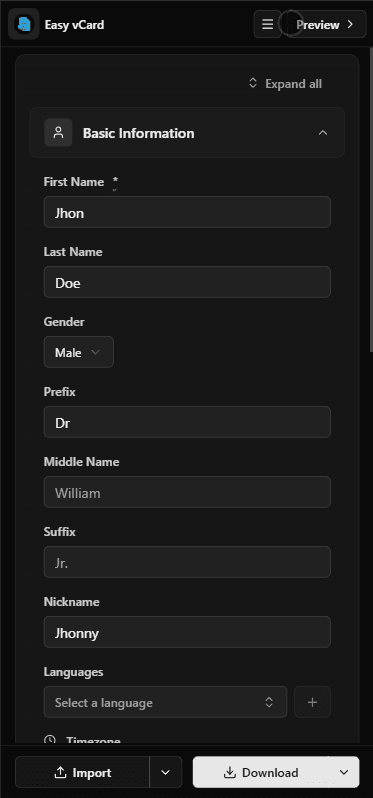
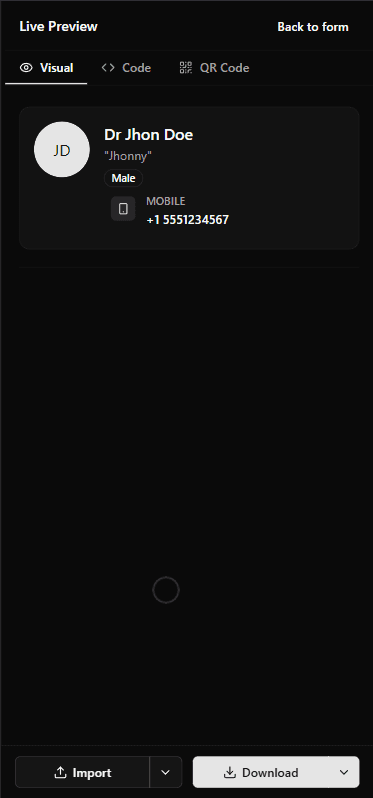
Choose how to use it
Who it's for
For migrations, backups and everyday contacts
- Anyone handed a .vcf they can't open
- Exported from a phone, a CRM or an old address book — desktop operating systems still give you no real vCard editor.
- People moving between ecosystems and devices
- Moving between Android, iOS, Outlook or Google? Clean up the card, keep a local backup, and export the .vcf the other side accepts.
- Freelancers and small teams
- Turn your details into a QR code or a contact-card image for a slide, a badge or an email signature.
- Developers and privacy-minded users
- Read the raw VCF, choose the emitted version, drive the editor from an agentic browser — and never paste a contact list into an online converter.
For technical users
See the actual output, not a black box
The Code tab shows the exact VCF the app will write, ready to copy. Switch the target version and watch the properties change.
Inspect the output
The raw VCF view makes the result easy to inspect, copy and use in technical workflows.
MIT licensed, fully auditable
Every important behavior is visible in the source, making it easy to audit how your contacts are handled and verify that privacy stays local.
BEGIN:VCARDVERSION:4.0N:Arriaga;Marisol;Beatriz;Dra;FN:Dra Marisol Beatriz ArriagaNICKNAME:MariORG:Exologic;EngineeringTITLE:Systems ArchitectTEL;TYPE=cell:+525541829037EMAIL;TYPE=work:marisol.arriaga@example.comTZ:America/Mexico_CityX-TELEGRAM:@marisolarriagaEND:VCARDFAQ
Questions worth answering
A vCard is the standard text format for a contact: name, phone numbers, emails, addresses, organization and much more. It is what your phone exports when you share or back up contacts, and a single .vcf file can hold one card or hundreds.
Nowhere. There is no server to send it to. Files are parsed in your browser and the library is kept in your browser's local IndexedDB storage. The source is open, so the claim is auditable rather than a promise.
Choose 3.0 for maximum compatibility, 4.0 for the modern spec, and 2.1 only for legacy targets. The app writes all three, so you can export the same contact more than once.
Yes. It is a Progressive Web App — install it from your browser and it keeps working offline. On small screens the preview and the contact list become slide-in panels.
Yes. No account, no ads, no limits, no paid tier. The project is MIT-licensed and open source.
Yes. Their contact exports are vCard files, so you can import the resulting .vcf directly. The app also accepts pasted raw vCard text.
Open a .vcf, edit it, export it
For one contact or hundreds. No account, no upload, no cost. Just open the editor.